
Some good practices in component testing (using React Testing Library)
Testing approach
- Use React Testing Library, it’s awesome!
- Use
screen.logTestingPlaygroundURL()for the most semantic and accessible selectors in your tests - Use
screen.getByRoleorscreen.getByTextprimarily for querying elements - Use
data-testidfor querying elements only if getByRole or getByText is not sufficient (e.g. dynamic language changes the label of elements) - Don’t use
ids orclassNameto find elements - Understand the difference between getBy (sync), findBy (async) and queryBy (conditional) element queries
- Test if component renders with required props
- Test if component renders with custom props
- Test component listening to callbacks from child
- Mock what you can
- Use easily readable string values in props and assertions instead of object dictionaries
- Stick to testing boundaries
- UI components should have an optional
testIDprop, which renders adata-testidwith the appropriate value on the component’s wrapper element - Components nested within other components are passed the
testID, so they can generate their own internaltestIDs (e.g.: ‘hero’ ⇒ ‘hero-image’) - Minimise the reliance on
data-testid, (but component should supportdata-testid, so QA testers can use them with e2e tests such as Playwright) - Test component states (open modal, close modal)
- Test with component states with keyboard navigation (TAB, ENTER, ESC)
- Use
userEvent, don’t usefireEventto fire user events - Avoid common mistakes with React Testing Library
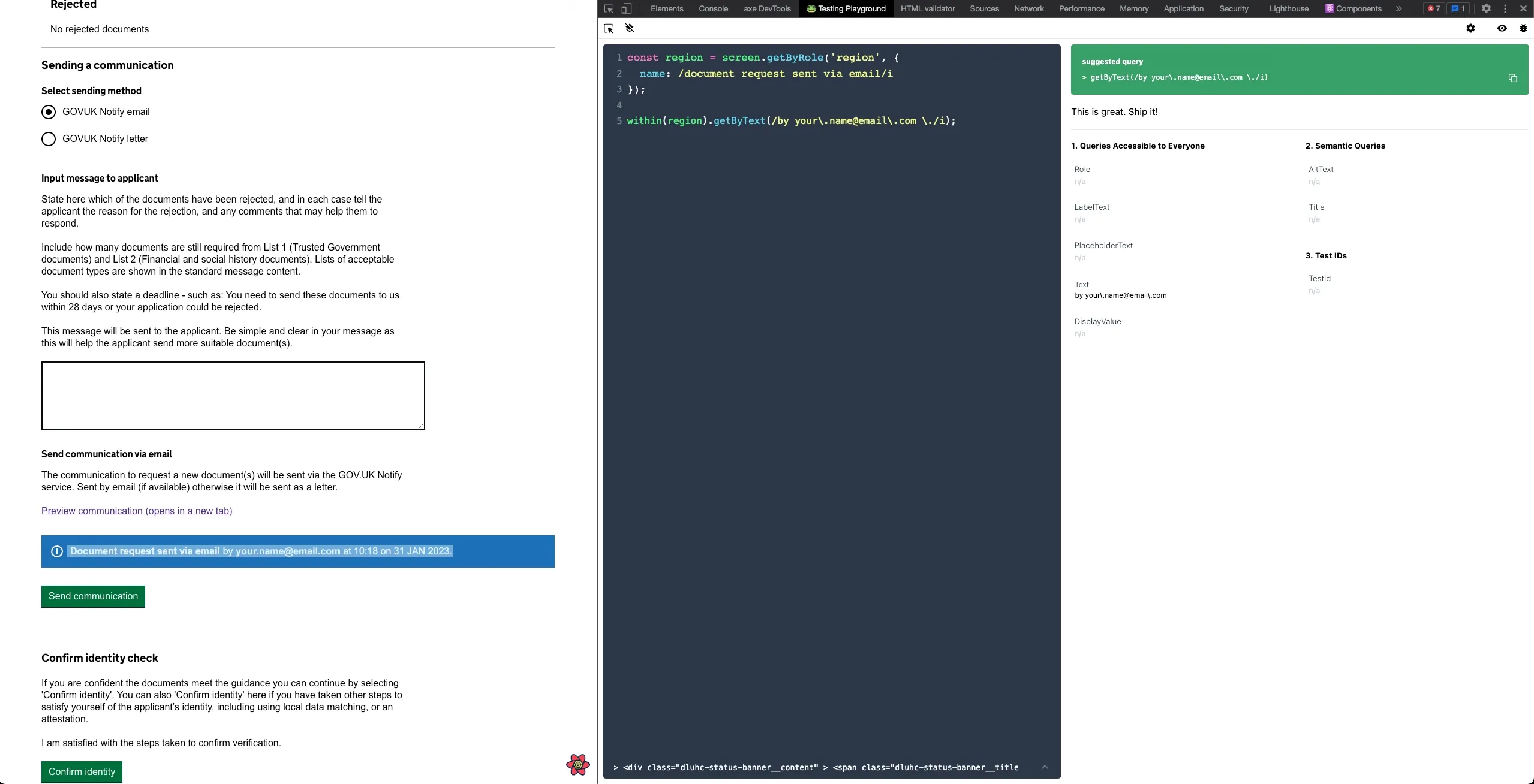 The Testing Playground Chrome extension providing an accessible element selector by the user clicking the element in the browser
Testing recipes
Recipe #1 - Use getByRole and within

const letterStatusBannerRegion: HTMLElement = screen.getByRole('region', {
  name: /document request sent via letter/i,
});

expect(letterStatusBannerRegion).toBeInTheDocument();
expect(within(letterStatusBannerRegion).getByText(/by your\.name@email\.com \./i)).toBeInTheDocument();
expect(within(letterStatusBannerRegion).getByText(/at 10:18 on 31 jan 2023./i)).toBeInTheDocument();
Recipe #2 - Testing state in hooks
Interestingly I’ve found that testing state in hooks doesn’t work when using destructuring assignment, because the destructuring assignment returns a “snapshot” of values from the result.current object, and will not update when a state update happens.
import { renderHook } from '@testing-library/react'

describe('useCommunication()', () => {
  it('sets the channel', async () => {
    const { result } = renderHook(() =>
      useCommunication({
        channel: 'email',
      }),
    )

    // This will pass
    expect(result.current.channel).toBe('email')
    act(() => {
      result.current.setChannel('letter')
    })
    expect(result.current.channel).toBe('letter')

    // This will fail
    /*
		const { channel, setChannel } = result.current;
    expect(channel).toBe('email');
    act(() => {
      setChannel('letter');
    });
    expect(channel).toBe('letter');
		*/
  })
})
Recipe #3 - Find an element by role and matching aria description
<p id="message-hint">For example, "Hello world".</p>
<textarea name="message" label="Message" aria-describedby="message-hint" />
DOM of text area described by a paragraph of text
expect(
  screen.getByRole('textbox', {
    description: /for example, "hello world"\./i,
  }),
).toBeVisible()
RTL query to find texture by role and description
Resources
- Testing playground: https://testing-playground.com/
- Testing playground Chrome extension: https://chrome.google.com/webstore/detail/testing-playground/hejbmebodbijjdhflfknehhcgaklhano?hl=en~~
- Testing library queries: https://testing-library.com/docs/queries/about/
- Testing library cheat sheet: https://testing-library.com/docs/react-testing-library/cheatsheet/
- Common mistakes with React Testing Library - https://kentcdodds.com/blog/common-mistakes-with-react-testing-library